Razer introduces the new mobile controller: Prio, compatible with almost any mobile phone and fits in your pocket.
Razer launches Prio, a mobile controller that combines broad compatibility, compact design and functionality to enhance the gaming experience on any smartphone.
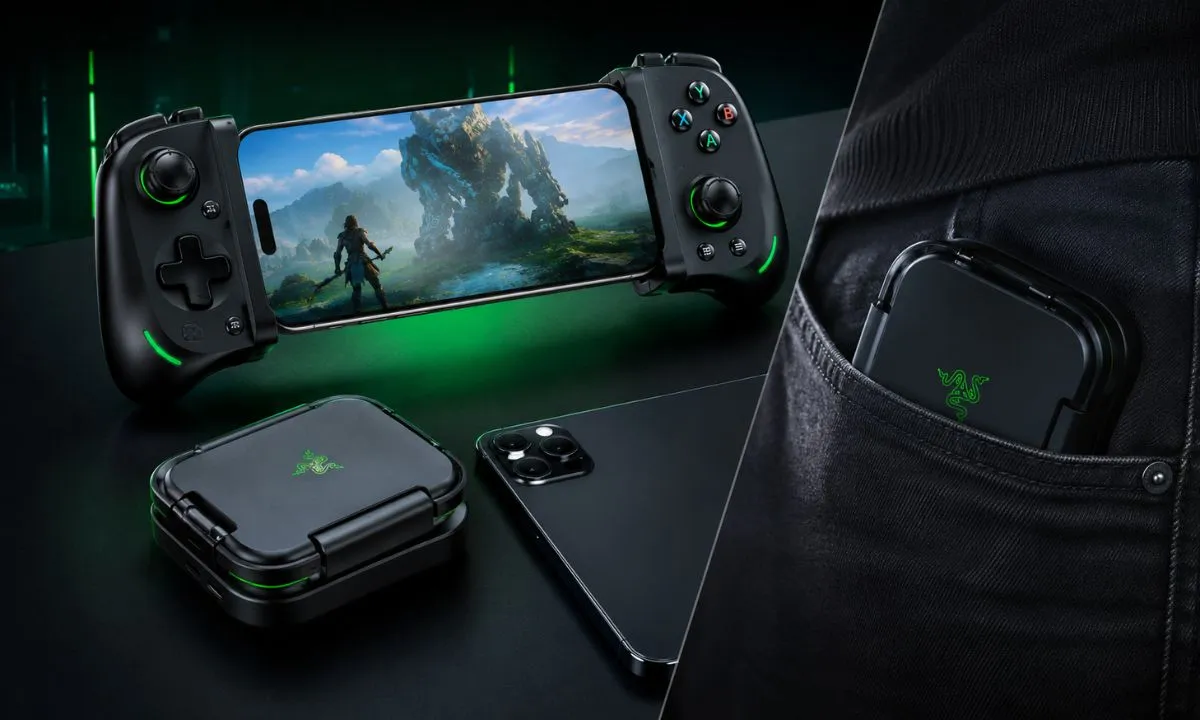
Razer has just surprised mobile gaming enthusiasts with the launch of its new wireless controller, the Prio. This device stands out for its compact design that fits easily in a pocket, and for its impressive compatibility with a wide range of smartphones, making it a versatile option for gamers looking to enhance their mobile gaming experience without complications.
What is the Razer Prio controller and why is it relevant for mobile gamers?
The Prio controller is Razer's latest accessory designed for gamers who enjoy playing on mobile devices. Unlike other controllers that can be bulky or have limited compatibility, the Prio stands out for its small size and ability to connect to almost any smartphone, whether Android or iPhone.
This is especially relevant in a market where mobile gaming is gaining popularity and the demand for physical controllers that offer precision and comfort is on the rise. With Prio, Razer aims to meet this need by offering a solution that adapts to different users and play styles.
Compact and portable design: a controller that fits in your pocket
One of the Prio's biggest selling points is its design. Razer has managed to create a controller that doesn't sacrifice functionality for size. Its compact dimensions allow it to easily slip into your pocket, making it easy to take anywhere and play anytime.
This portable design is ideal for those who travel or prefer to play on the go, as they don't need to carry heavy or bulky equipment. Furthermore, the controller features the high-quality finishes and materials typical of Razer, ensuring durability and a great tactile experience.
Compatible with almost any mobile phone: one remote for everyone
Prio stands out for its broad compatibility. It uses Bluetooth to pair with smartphones regardless of brand or operating system, including the latest iPhone models and a wide variety of Android devices.
This feature is key because it prevents users from having to search for specific controllers for their phone or being limited to certain models. Furthermore, Razer has optimized latency for a smooth, lag-free gaming experience, a crucial aspect for competitive or fast-paced action games.
Technical features and main functions
The Prio controller includes several elements that enhance the gaming experience:
- Complete controls: It features analog sticks, face buttons, a cross-pad, and triggers that replicate the classic console controller configuration.
- Long-lasting battery: with autonomy that allows for extended sessions without the need for constant recharging.
- Bluetooth 5.0 connectivity: for a stable and fast connection with your mobile phone.
- Ergonomic design: designed to offer comfort during long sessions and prevent hand fatigue.
These features make Prio not only compatible and compact, but also functional and comfortable to use in different types of games.
How to connect and use the Prio remote on your mobile phone
Setting up Prio is easy, even for those who are not used to using external controllers:
- Activate Bluetooth on your mobile phone and turn on the Prio remote.
- Search for available devices in your phone's Bluetooth settings.
- Select Razer Prio to pair it.
- Once connected, open your favorite game that supports external controllers.
- Configure the controls if the game allows it and start playing.
This ease of connection helps more players, regardless of their technical level, to enjoy an enhanced experience.
What types of games benefit from using the Prio controller?
Although Prio can be used with many games, it is especially useful for genres that require precision and speed, such as:
- First-person shooter (FPS) games
- Racing games
- Platforms and action
- Fighting games
These genres are often more difficult to master using only the touchscreen, so a physical controller can make all the difference in performance and enjoyment.
Comparison with other mobile phone controllers on the market
Compared to other popular commanders, Prio stands out for:
- Portability: many controllers are larger and less convenient to carry.
- Compatibility: Some devices are limited to certain brands or operating systems.
- Razer design and quality: with a reputation for manufacturing high-quality gaming peripherals.
Although there are cheaper options, Prio positions itself as a premium alternative that offers a balance between size, functionality and compatibility.
Tips for getting the most out of the Prio controller
To get the most out of your new controller, consider the following:
- Update the firmware of both the controller and the phone to ensure compatibility and performance.
- Adjust the control settings in games to personalize the experience.
- Take care of the battery by charging it before long sessions.
- Use a cover or case to protect the controller when not in use.
Related links for mobile gamers
If you're interested in learning more about mobile gaming accessories and technology, you can check out our articles on [the best smartphones for gaming in 2024](https://lobitoisaias.com/mejores-smartphones-para-juegos), or discover [how to optimize your mobile for lag-free gaming](https://lobitoisaias.com/optimizar-movil-juegos).
Frequently Asked Questions
Does the Prio controller work with all mobile games?
Prio is compatible with most games that support external controllers via Bluetooth, but some titles may not recognize controllers or may require additional setup.
Can I use the Prio controller with tablets or only with mobile phones?
Yes, Prio is also compatible with tablets that have Bluetooth and support for external controllers.
How long does the Prio remote control's battery last?
The battery offers several hours of continuous use, ideal for long gaming sessions, although the exact duration depends on usage and settings.
Do I need to download an app to use the controller?
It's not mandatory, but Razer may offer an application to update the firmware and adjust advanced settings.
Where can I buy the Prio controller and what is its approximate price?
Prio is available at official Razer stores and authorized retailers; price may vary depending on region and current promotions.
With Prio, Razer is aiming for a more accessible, comfortable, and high-quality mobile gaming experience. If you want to improve your mobile gameplay, this controller could be the perfect addition for you.