What is the best software for signing PDFs?
Software to sign PDFs online without having to log in; discover the best and fastest PDF signing software on the market.
What does it mean to sign a PDF and why does it matter?
Signing a PDF is the process of adding an authentication mark to a digital document, whether it's an image of your handwritten signature, a stroke drawn on the screen, or a cryptographic signature that guarantees legal integrity.
Last year, millions of contracts, authorizations, invoices, and HR documents were sent signed in PDF format. If you're still printing them out to sign and then scanning them, you're wasting valuable time.
Digital PDF signatures solve three specific problems: they eliminate paper, streamline workflows, and, when done correctly, have the same legal validity as a handwritten signature in most Latin American and European legislations.
In countries like Mexico (NOM-151-SCFI-2016), Colombia (Law 527 of 1999), Argentina (Law 25.506), and Spain (EU eIDAS Regulation), advanced or certified electronic signatures have full legal validity. Understanding what type of signature you need is the first step before choosing software.
Types of electronic signatures
Not all PDF signatures are created equal. Before choosing software, identify what level you need:
Signature with image (simple electronic signature)
This involves overlaying a PNG or JPG image of your signature onto the PDF. It's the fastest, free, and most accessible option. It's suitable for internal documents, family authorizations, work forms, non-sensitive contracts, and everyday procedures.
This involves overlaying a PNG or JPG image of your signature onto the PDF. It's the fastest, free, and most accessible option. It's suitable for internal documents, family authorizations, work forms, non-sensitive contracts, and everyday procedures.
It does not include cryptographic encryption, but it is legally accepted in most private contexts.
It does not include cryptographic encryption, but it is legally accepted in most private contexts.
Advanced electronic signature
It uses digital certificates (PKI) to link the signature to the signer's identity. The document is then sealed: any subsequent modification invalidates the signature.
It's the ideal option for important business contracts, notarized documents, and business workflows. It requires specialized software such as Adobe Acrobat, DocuSign, or tools certified by the FNMT (Spain) or SAT (Mexico).
Qualified electronic signature
This is the highest level. It requires a signature creation device (USB token, SmartCard) issued by an accredited certification authority.
It has the same validity as a notarized signature in the EU. For everyday use it's not necessary, but if you work in regulated sectors (healthcare, legal, finance), you should consider it.
💡 Practical tip: For 90% of everyday situations (lease agreements, letters, employment forms, school authorizations), a digitally recognized signature is more than sufficient. Save yourself the cost of a certified digital signature if you don't need one.
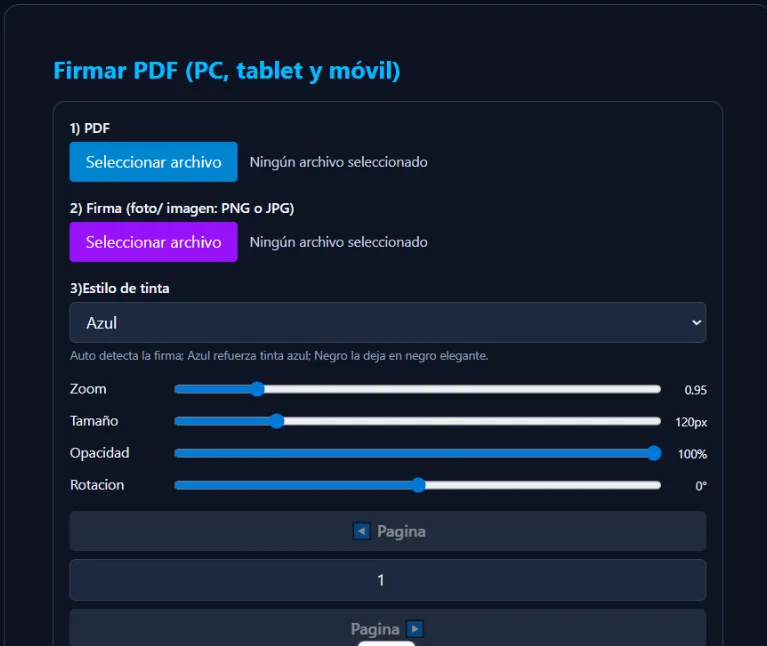
- Upload any PDF from your computer, tablet, or mobile phone
- Upload your signature as an image (PNG or JPG) with support for transparent backgrounds.
- Adjust position, size, opacity, and rotation with real-time visual controls
- Select the exact page where your signature will go.
- Choose the ink style (black, blue) for a more natural finish
- Download the signed PDF instantly, ready to send or upload to any platform.
Sign PDFs Online – Isaias the Little Wolf
The easiest way to sign your PDF documents without installing any software. Works on mobile, tablet, and PC. No registration, no watermarks, completely free.
One of the advantages that sets this tool apart is that it processes the file locally in your browser: the PDF is not uploaded to any external server, which protects your confidential documents. This is especially important if you are going to sign contracts with personal data, payroll documents, or medical forms.
Furthermore, if you need to make changes to the document's content before signing, you can convert your PDF to Word here, edit it easily, and then sign it again with this tool. The entire workflow remains within the same ecosystem, without switching between dozens of applications.
| Software / Tool | Price | Platform | Signature type | Privacy | Assessment |
|---|---|---|---|---|---|
| Little Wolf Isaias – Sign PDF | Free | Web, Mobile, PC | Signature with image | Local High | ★★★★★ |
| Adobe Acrobat Reader | Basic free | Windows, Mac, Mobile | Image + drawn | Average | ★★★★☆ |
| Adobe Acrobat Pro | ~$12.99/month | Windows, Mac, Web | Image + Digital PKI | Average | ★★★★★ |
| DocuSign | Starting at $10/month | Web, Mobile, API | Electronic + Certified | Business | ★★★★☆ |
| Smallpdf online | Freemium | Web | Image + drawn | Server download | ★★★☆☆ |
| ILovePDF online | Freemium | Web | Image | Server download | ★★★☆☆ |
| LibreOffice Draw | Free | Windows, Mac, Linux | Basic Digital Image + | Local High | ★★★☆☆ |
| Foxit PDF Editor | ~$7.99/month | Windows, Mac, Web | Image + Digital PKI | Average | ★★★★☆ |
| macOS/iOS Preview | Free | Apple only | Drawn trackpad/camera | Local High | ★★★★☆ |
| Google Drive + Extensions | Free | Web | Basic image | Download Google | ★★☆☆☆ |
Source: Own analysis based on official documentation of each platform, user tests and evaluations from communities specializing in digital productivity.
Recommendations by use case
For personal use and everyday tasks: If you need to sign a school authorization form, a simple lease agreement, a job letter, or any other common form, Lobito Isaias's tool is the smartest choice. Zero cost, zero registration, zero installation. In less than two minutes, you'll have your document signed and ready to download.
Isaiah the Little Wolf PDF — For businesses and advanced workflows of different levels
If you manage frequent business contracts and need certified digital signatures with PKI, Lobito Isaias PDF remains the industry standard. Its integration with various advanced tools and ERP systems makes it indispensable in corporate environments. 💼 Corporate 🔐 PKI 💵 Paid
DocuSign — For multi-party signing workflows
When a contract needs to be signed by multiple people in an organized manner with full legal traceability, DocuSign leads the market. It offers automatic notifications, audit history, and legal compliance in over 180 countries. Multi-signer, Legal validity, From $10/month.
Preview (macOS/iOS) — For Apple users
If you use a Mac or iPhone, the native Preview app lets you sign PDFs directly with your trackpad, camera, or Apple Pencil. The quality of the captured signature is surprisingly good, and everything happens locally without sending any data to a server. Only Apple, Free, Private.
LibreOffice Draw — For Linux and free software users
LibreOffice includes basic support for inserting signature images into PDF documents and exporting them. It's the only robust, completely free option for Linux users who prefer to work offline. Linux, Open Source, Offline.
What about Smallpdf and ILovePDF?
Both are popular platforms, but there's something many users don't consider: your files are uploaded to their cloud servers. For sensitive documents (contracts, payroll, documents containing personal data), this poses a real privacy risk.
Furthermore, their free version has quite restrictive daily usage limits. They work well for occasional use with non-sensitive documents, but they aren't the first recommended option.
⚠️ Be careful with the tools that upload your files. Before using any online service to sign PDFs, check if the processing happens in your browser (safe) or if the file is sent to their servers. Tools like Smallpdf and ILovePDF temporarily store your documents. If you handle confidential information, always prioritize tools that process locally.
Complementary tools for Little Wolf Isaiah
Signing a PDF is often just one part of the process. Before or after signing, you might need to prepare, convert, compress, or merge your document. Lobito Isaias offers a complete ecosystem of free, registration-free, and locally processed tools for all of these:
- PDF to Word — Edit the PDF content before signing it. Convert to .docx with a single click.
- Compress PDF — Reduce the file size before uploading if it is too large for the signature tool or for sending by email.
- Merge PDF — Combine multiple documents into one before signing the entire package.
- PDF to Image (JPG/PNG) — Convert pages from your PDF to an image for quick preview sharing.
- Word to PDF — If you drafted the document in Word, convert it to PDF first and then sign it.
- PDF to Text — Extract the text from any PDF for review, correction, or reuse.
This complete workflow within a single platform — and all for free — is a real advantage over having to use five different apps from different providers to do the same thing.
📌 Recommended workflow
- If the PDF has content errors → Convert to Word, edit, and save as a PDF
- If the file is too large → Compress the PDF
- If you need to merge multiple documents → Merge the PDFs first
- Finally → Sign the PDF online and download it
Pros and cons: free vs paid tools
One of the most frequently asked questions is whether it's worth paying for PDF signing software or if free options are sufficient. The answer depends on how often you'll use it and the level of legal validity you require. This table summarizes it:
| Criterion | Free Tools | Paid Software |
|---|---|---|
| Cost | $0 | $7 – $30+/month |
| Speed of use | Very fast, no registration required | Quick, requires an account |
| Signature with image | ✓ Yes | ✓ Yes |
| Certified digital signature PKI | ✗ No | ✓ Yes |
| Multi-signer / Approval workflow | ✗ No | ✓ Yes |
| Legal audit history | ✗ No | ✓ Yes |
| Document Privacy | Register if you are a local Lobito Isaias | Variable depending on the supplier |
| Ideal for | Personal use / low-medium frequency | Critical companies/contracts |
| Learning curve | Very low | Average |
Our own analysis based on official documentation and functional testing of each tool. Reference prices for the Latin American market.
If you're a freelancer, student, independent professional, or simply need to sign documents occasionally, free tools like Lobito Isaias perfectly cover 100% of your needs at no cost.
The switch to paid tools only makes sense when the volume of critical contracts is high and legal responsibility requires it.
Technical aspects, metadata, security and formats
For those who work with technical documents or need an additional level of understanding about how digital signatures work in PDFs, here are the most relevant aspects:
PDF/A format and long-term archiving
The PDF/A standard (ISO 19005) is the version of PDF designed for long-term archiving. If you plan to store signed contracts for years (for tax or legal purposes), ensure that the software you use saves the file in PDF/A-3 format.
Adobe Acrobat Pro and Foxit support this standard; free online tools generally do not.
Signature with X.509 certificate and PKI
Certified digital signatures use the X.509 standard to link an identity certificate to the signature. When you open a PKI-signed PDF in Adobe Reader, you'll see a "Signatures" panel that shows who signed, when, and whether the document was subsequently modified.
This is what provides robust legal validity before courts and regulatory bodies.
Timestamps
Services like DocuSign or Adobe Sign add a cryptographic timestamp (RFC 3161) to each signature, guaranteeing that the signature existed at a specific date and time.
This is crucial in contractual disputes where the exact time of signing is relevant.
Is my PDF protected?
If the PDF has an editing password, you first need to remove that protection (with the owner's permission) before you can add a signature. Tools like Adobe Acrobat Pro allow you to manage password permissions.
If the document only has a read-only password, simply enter it and then proceed to sign.
🔧 Technical tip: difference between flattening and signing. "Flattening" a PDF converts all layers, annotations, and fields into a static image without layers. "Signing" adds a signature layer over the original content. Flattening is irreversible and removes form interactivity. Only flatten if you want an immutable final result and no longer need to edit anything.
Frequently Asked Questions
What is the best free software for signing PDFs?
For quick, casual use, Lobito Isaias' online tool is the best free option: no registration, no uploading files to external servers, and compatible with any device. For offline use on Windows or Mac, Adobe Acrobat Reader allows basic signing for free.
Is it legal to digitally sign a PDF?
Yes. In most Latin American countries and Spain, electronic signatures are legally valid for private documents, contracts, and authorizations. Mexico, Colombia, Argentina, Chile, and Spain have specific legislation that recognizes electronic signatures as equivalent to handwritten signatures for most everyday uses.
Can I sign a PDF from my phone without installing anything?
Yes. With Lobito Isaias's tool, you can sign directly from your phone or tablet browser without installing any app. It works in Chrome, Safari, Firefox, and any modern browser.
What is the difference between an electronic signature and a digital signature?
An electronic signature is any method that visually represents a signature (image, drawn line). A digital signature uses PKI cryptography to mathematically link the signature to the signer's identity and the document's content. Digital signatures have greater legal validity and are more secure, but they require identity certificates issued by a certification authority.
How to sign a PDF without Adobe?
There are multiple alternatives: Lobito Isaias' online tool (free, no registration required), Preview on macOS, LibreOffice Draw on Linux, or tools like Foxit PDF Editor and DocuSign for professional use. In most cases, you don't need Adobe to sign a PDF.
What image format is best for the signature?
The PNG format with a transparent background is ideal because it allows the signature to blend seamlessly into the PDF without a white rectangle around it. If you only have a JPG, make sure the signature has good contrast so the system can process it correctly.
Final verdict
After analyzing more than ten options on the market, the conclusion is clear: the best software for signing PDFs depends on your specific use case, but for most Spanish-speaking users the answer is simple.
If you need to sign documents occasionally or frequently, without paying, without registering, and with the peace of mind that your file never leaves your device, Lobito Isaias's free tool is the best option available in Spanish today. It's fast, private, works on any device, and is designed precisely for the tasks we perform daily.
If your company handles critical contracts with multiple signatories, requires notarized signatures, or needs integration with enterprise systems, then Adobe Acrobat Pro or DocuSign are the right investment. They are expensive compared to free options, but the level of security and legal traceability they offer justifies the cost in that context.
For freelancers, students, entrepreneurs, and independent professionals, spending money on PDF signing software in 2025 is completely unnecessary. Free tools have reached a level of quality that makes the experience convenient, fast, and secure enough for 90% of cases.
And remember: signing is just part of the process. If you need to compress your PDF, merge multiple documents, or convert it to Word for editing, you have all those tools available for free at Lobito Isaias pdf .
Ready to sign your PDF now?
No registration required. No installation required. Free of charge. Just upload your PDF, add your signature, and download it.