How to create a sticker with any word on WhatsApp
Discover how to easily and quickly create custom stickers with any word on WhatsApp. Learn how to use tools and apps to bring your messages to life.
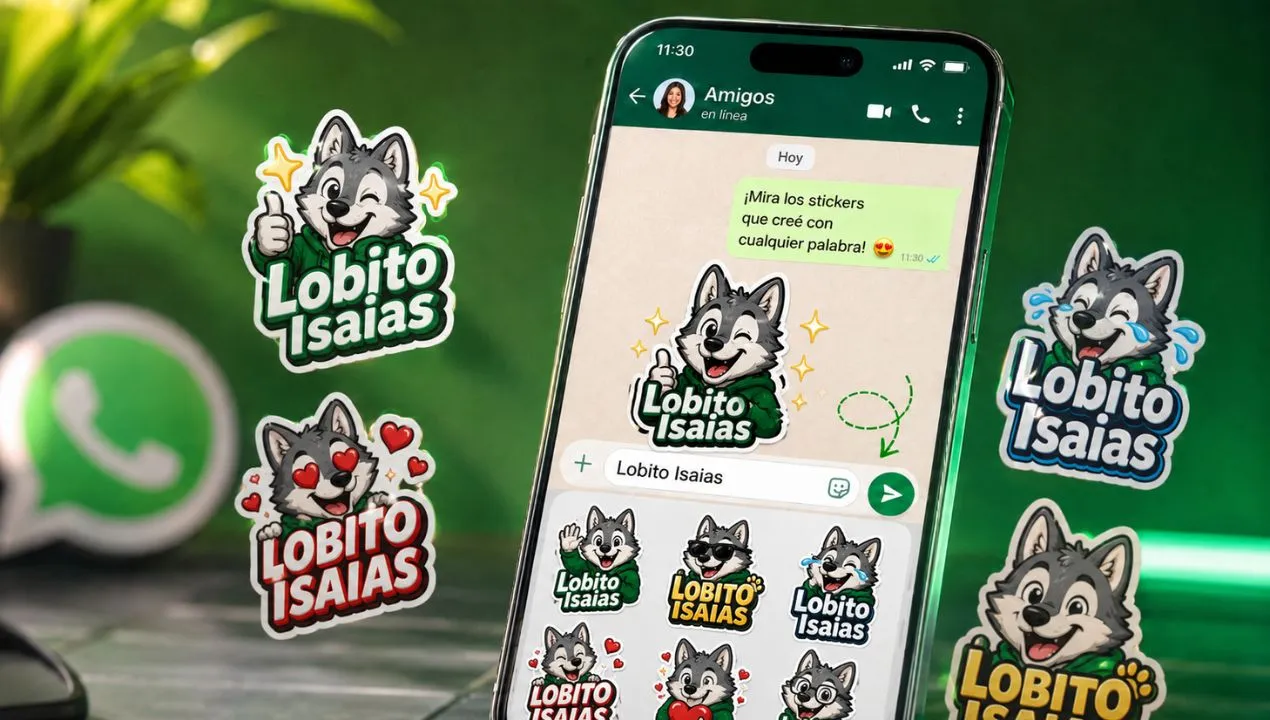
Creating custom stickers with any word on WhatsApp is a fun and creative way to express emotions or convey messages in a unique way. With just a few tools and apps, you can transform your favorite words or phrases into stickers that will make your conversations more dynamic and personal. This practice also improves interaction with your contacts by adding a personal and original touch to your chats.
Want to turn a word like "Hello," "Thank you," "I'm here," "I can't," or even a funny phrase into a WhatsApp sticker? Now you can do it directly from a conversation, without downloading additional apps, editing images, or having any design skills.
The text sticker feature lets you type a word or short phrase into the sticker search bar and automatically get several designs ready to send. The process takes just a few seconds and works as a quick way to highlight messages, reply with humor, or create expressions that don't usually appear in traditional sticker packs.
Make a sticker of any word
WhatsApp will display different graphical versions of the text. Just choose one and send it like any other sticker.
You might also be interested in : How to remove viruses from my cell phone

What are WhatsApp text stickers?
Text stickers are small images automatically created from a word or phrase typed by the user. Instead of searching for a sticker pack containing the exact phrase you need, WhatsApp uses the text entered in the search bar to generate a visual sticker.
It's not simply a matter of sending a message with large letters. The result behaves like a sticker: it appears as a separate image within the chat, can be saved, forwarded, and reused in other conversations.
For example, you might have lots of funny, surprised, or greeting stickers, but none that say "I'm out," "Check your email," or "I'm not available today." With the text sticker search tool, you can create these responses instantly.
Is it possible to create stickers with complete phrases?
Yes, it's possible to write more than just one word. You can enter short phrases like:
However, there's a difference between being able to write a sentence and achieving an attractive design. The more words you add, the smaller the font size can be.
How to create a custom sticker with text and an image
The search engine primarily creates text-based stickers. If you want to combine a phrase with a photo, face, object, or specific background, you should use the built-in sticker creator.
The general procedure is as follows:
This second option offers greater creative freedom. You can use a funny photo and add expressions like “It wasn’t me,” “Everything’s under control,” “I need a vacation,” or “Mission accomplished.”
Difference between a text sticker and a sticker created with a photo
Although both are shipped in the same way, they are not exactly the same.
Definition and function of stickers in WhatsApp
WhatsApp stickers are digital images that users can send within chats to communicate ideas, emotions, or actions visually and quickly. Unlike emojis, stickers can be customized and contain text, drawings, or any design the user wants. As a writer with experience in digital content, I've seen how stickers have revolutionized instant communication, facilitating richer expression.
Common signs or symptoms
- Desire to personalize messages: When emojis aren't enough to express something specific, people look to create stickers with words or phrases. This can enhance the connection in the conversation.
- Constant repetition of certain words or phrases: if you frequently use a word, turning it into a sticker can save time and make the chat more visual.
- Lack of suitable stickers in the app: when the official library does not contain stickers that reflect your style or language, creating your own is the solution.
Common causes
Cause 1: Limitations of pre-designed stickers
The stickers that come pre-installed on WhatsApp or in third-party apps are usually generic and don't always suit personal taste. Identifying this is simple: if you can't find stickers that convey exactly what you want, it's time to create your own.
Cause 2: Need for personalization and originality
Every user has phrases, words, or inside jokes they want to express. This need drives the creation of personalized stickers for more personal and unique chats. If you feel your conversations are repetitive, this is the sign.
Cause 3: Ease of creation thanks to applications
The availability of specialized sticker-making apps has democratized the process. What once seemed complicated is now simpler and more accessible to everyone. You'll notice this if you use apps like "Sticker Maker" or "Canva" to design your stickers.
Step-by-step (safe) solutions
Before you begin, make sure you use trusted apps and download content from official sources to avoid security issues.
- Step 1: Choose an app to create stickers - use apps like "Sticker Maker" or "Personal Stickers for WhatsApp". Take a few minutes to familiarize yourself with the interface.
- Step 2: Type the word or phrase you want to turn into a sticker - customize the style, color, and font. Make sure the text is legible and the design is appealing.
- Step 3: Export and import the sticker to WhatsApp - Once the sticker is ready, save it and add it to your sticker collection in WhatsApp. If you see any errors or the sticker doesn't look right, correct them and repeat the process.
Quick alternatives
- Option A: Use online sticker generators - they are fast and require no installation, but offer less customization.
- Option B: Create images in graphic editors and convert them into stickers - greater creative control but more time and technical knowledge.
Costs and when to call a technician
Generally, creating custom stickers is free if you use basic apps available in official app stores. However, some apps offer premium versions with more features, which can range in price from $1 to $10 USD. Factors that influence the cost include the complexity of the design, the platform used, and whether you need professional help.
You should consider contacting an expert or graphic designer if you want very elaborate, animated stickers, or if you have technical problems exporting and importing stickers in WhatsApp.
Common mistakes to avoid
- Error 1: Using copyrighted sources or images - to avoid legal problems, create original content or use free resources.
- Error 2: Not checking the readability of the text - make sure the word is easy to read in different sizes.
- Error 3: Ignoring the format compatible with WhatsApp - stickers must be in WebP format and meet the recommended size to function correctly.
Preventive maintenance (checklist)
- Update the sticker creation app - every month.
- Check sticker compatibility with the latest version of WhatsApp - every 3 months.
- Remove unused stickers to keep your collection organized - every 2 months.
Frequently Asked Questions
Can I create stickers with personal photos? Yes, many apps allow you to transform photos into custom stickers.
Is it possible to use stickers created on other devices? Yes, but you must export and import them manually or sync using backups.
Do I need to pay to create my own stickers? No, you can do it for free with several apps available in the official app stores.
Resources and references
- WhatsApp Help Center (creation of official stickers): https://faq.whatsapp.com
- Sticker Maker App (Google Play and App Store)
Creating stickers with any word on WhatsApp is a simple and fun way to personalize your messages and make your conversations more expressive. By following the steps and recommendations we've given you, you can easily design your own stickers and share them with your contacts. Don't wait any longer, start adding a unique touch to your chats today and surprise your friends with your creations!